Manufacturer API Usage Guide
This guide details steps to utilize the Kwikee Manufacturer API to maintain another database of product content or to query your content. The endpoints described in this guide can be used to access all your content in Kwikee, including archive and work-in-progress materials. Every entity in the system is an asset with a unique ‘assetId’ including brands, product versions, product variants, images and permission groups.
On this page:
Text in red font, highlights the exact names of API endpoints like Product Structure - GTIN
Attribute or parameter names are in single quotes like ‘assetId’
Values are in double quotes like “2000-01-01T00:00:00Z”
ENDPOINT DESCRIPTIONS
The following descriptions summarize the API endpoints used in this document. Detailed specifications can be found at portal.kwikee.com
GTIN List updated since: Returns JSON with a list of GTIN strings for current products on which data or images have changed since the provided timestamp.
Product Structure – GTIN: Returns JSON with the product entity structure of the current version of the product with the provided GTIN. The structure includes images for the product entity and sub-structures with ‘assetId’s of other product versions and product variants that are tied to the current version.
Product Structure – Asset ID: Returns JSON with the product entity structure of the provided ‘assetId’ which can be the ‘assetId’ of any product version or product variant.
Product Version – Retrieve: Returns JSON with product data for the provided ‘assetId’ which can be a product version or product variant entity.
Image Asset – Retrieve: Returns JSON with the image meta data for the provided image ‘assetId’. Image metadata includes all attributes and a ‘files’ substructure. Files are provided by URL.
Open Image URLs - GTIN: Returns JSON with image metadata and URLs of product images published on the Kwikee CDN for the current product that matches the 14-digit GTIN code.
Open Image URLs - Asset ID: Returns JSON with the image metadata and URLs of the product images published on the CDN for the product ‘assetId’ provided.
COMMON API USES
INITIALIZE OR REFRESH ANOTHER DATABASE OF CONTENT
NOTES
This workflow focuses only on current product version assets and ignores archive or work-in-progress versions.
STEPS
Call the GTIN List updated since API endpoint with the following parameter
Parameter: ‘updatedSince’, value: “2000-01-01T00:00:00Z”
For each GTIN listed call the Product Structure - GTIN endpoint
The ‘assetId’ of the current product version is the ‘assetId’ in the returned data structure
Store this ‘assetId’ for future use
Call the Product Version – Retrieve endpoint with the ‘assetId’ from the previous step
The returned data structure has all product data for the current product version
For each image ‘assetId’, Call the Image Asset – Retrieve endpoint
Store the image ‘assetId’ in your database for future use
RETRIEVING OPEN IMAGE URLS
Details about Kwikee’s CDN hosted open image URLs are provided in the Open Image URLs section below, including the content requirements for hosting.
RETRIEVING OPEN IMAGE URLS FOR THE “CURRENT” PRODUCT VERSION
Call the Open Image URLs - GTIN endpoint with your GTIN value
This will return JSON with URLs for all CDN hosted images on the “current” product version of that GTIN
RETRIEVING OPEN IMAGE URLS FOR ANY PRODUCT VERSION OR VARIANT
Call the Product Structure - GTIN endpoint with your GTIN value
This endpoint is the entry way into the product and its JSON includes arrays for other product version and variant entities in our systemFind the ‘assetId’ tied to the product version or variant entity for which you need open URLs
Call the Open Image URLs - Asset ID endpoint with the ‘assetId’ of your product version or variant
This will return JSON with URLs for all CDN hosted images tied to that product entity. As noted above, there are content requirements for CDN hosted open image URLs, so if you do not get the URLs you expect, please work with your Project Coordinator.
USING EXPIRY DATE
The ‘expiryDate’ represents the date the product or image asset should be archived or removed from the client asset management system. Expired assets will always remain in the feed but are assetId’s referenced from the current product that rarely change after they expire.
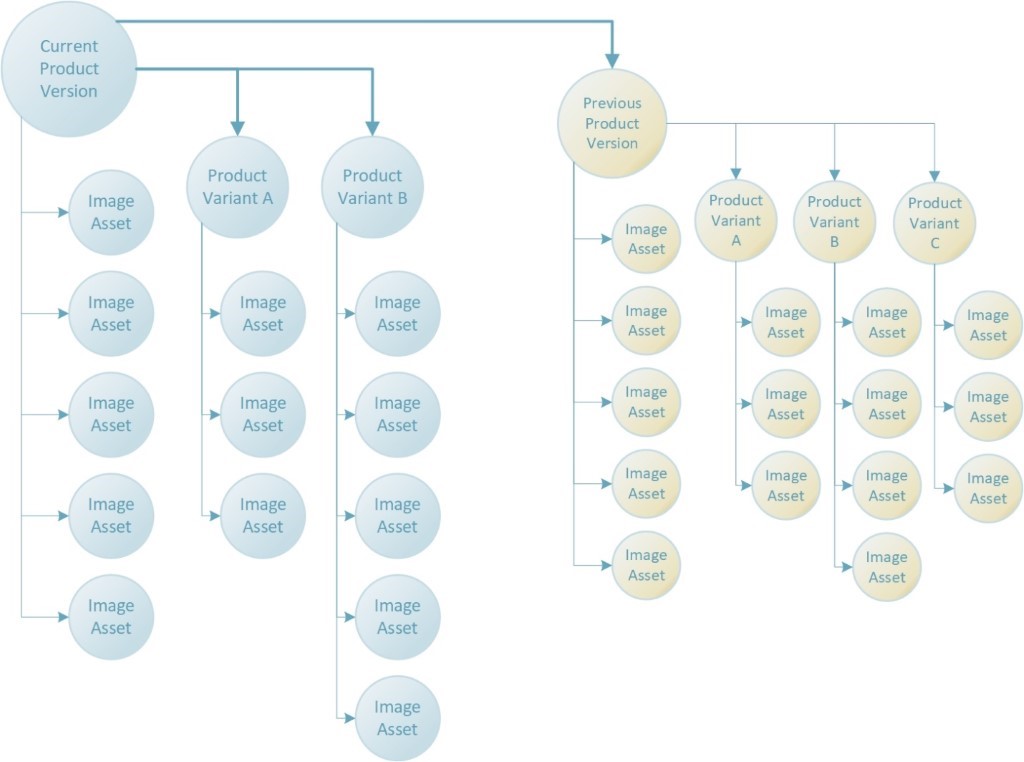
ILLUSTRATING PRODUCT VERSION AND PRODUCT VARIANT STRUCTURES
The following diagram illustrates a more complete product data structure including an old product version and many variants.
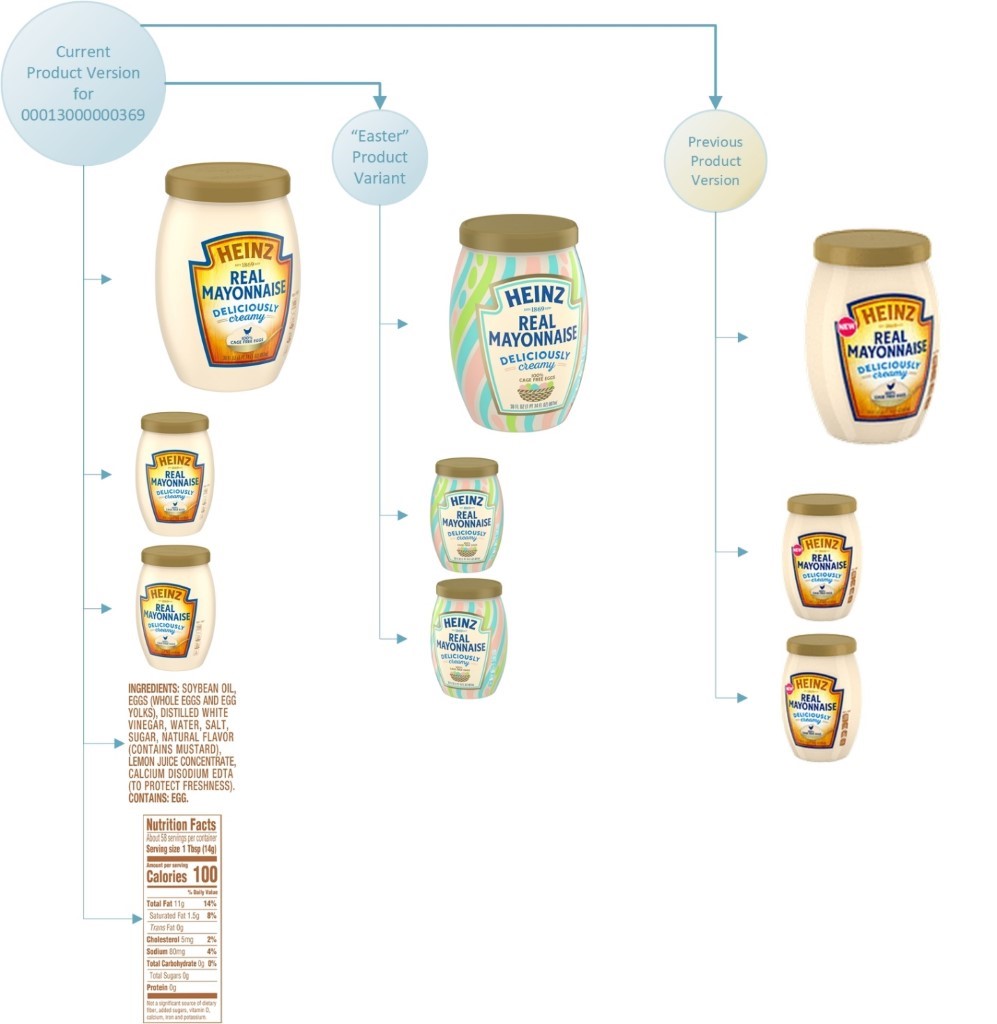
The next diagram provides a real-world example of a product with one old version and one variant.
ACCESSING OTHER PRODUCT VERSIONS
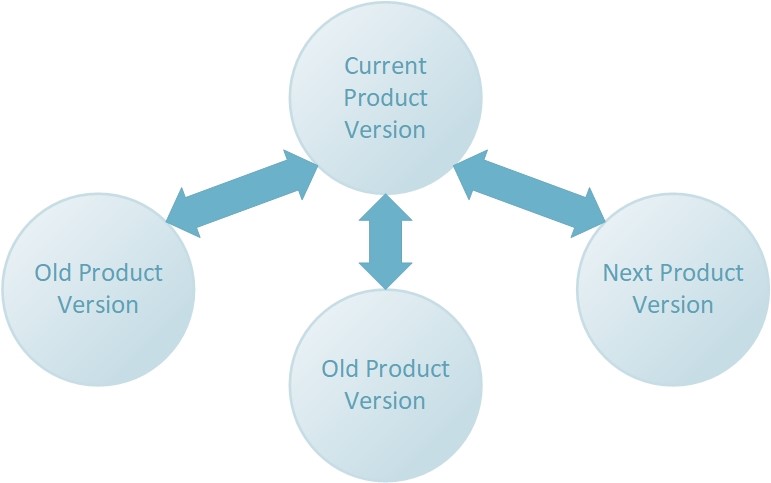
The Product Structure - GTIN endpoint always returns the product structure of the current product version for a given GTIN. When a new product version becomes primary, Product Structure - GTIN will return a product structure with a new ‘assetId’ at the top level and the replaced product version’s ‘assetId’ will appear in the ‘versions’ sub-structure.
The complete structure for the old product version, or any product version, can be access by using the Product Structure – Asset ID endpoint. Old product versions, or any non-current product version, will only report a relationship with the current product version.
The product structure within the database is centered on the current product version as illustrated in the following diagram.
ACCESSING PRODUCT VARIANTS
Product Variants are always tied to a Product Version and appear in the product structure in the ‘variants’ sub-structure.
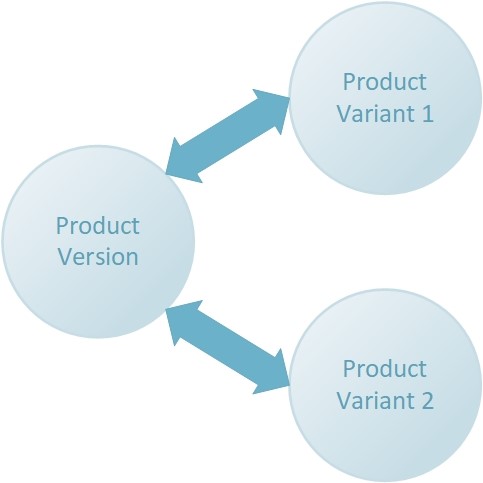
Product Variant structure information can be retrieved by using the Product Structure – Asset ID endpoint. Product Variant data can be retrieved by using the Product Version – Retrieve endpoint with the variant ‘assetId’. Product Variants support an identical data structure to Product Versions and therefore data is retrieved using the same endpoint.
OPEN IMAGE URLS
DETAILS
Kwikee CDN hosted open image URLs provide authentication free URLs which can be embedded in other systems, applications, or web pages. Kwikee provides one URL per product image asset with the best quality JPG file available for that asset.
The filenames used in our image URLs are derived from the ‘baseFilename’ attribute described in the “Kwikee API Image Identification” document which you can reference for format and code definitions.
REQUIREMENTS
Your Kwikee team will work with you to ensure your product content meets the requirements for CDN hosted open image URLs. Those requirements include the following.
Product and images published in the Kwikee CDN publishing environment
Product image assets with GS1 codes or a Kwikee Special Code
Product image assets with a Kwikee:GS1 file type or a Kwikee:JPG file type